Semantic Search for Documents Explained
Find the right passage by meaning, not just exact keywords, across contracts, research papers, and internal docs.
MindParse AI3 min read
Find the right passage by meaning, not just exact keywords, across contracts, research papers, and internal docs.
Semantic search matters because documents rarely use the exact words you are thinking of.
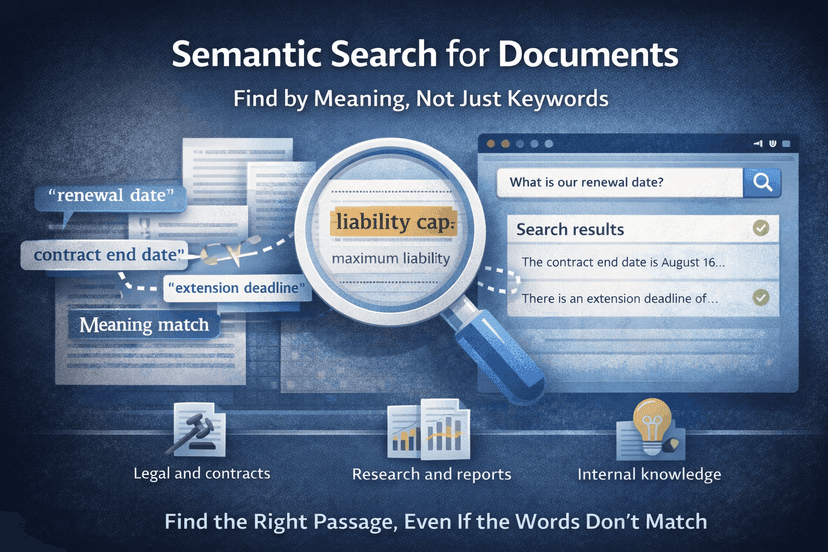
You search for "renewal date" and the contract says "extension deadline". You search for "liability cap" and the clause says "aggregate liability shall not exceed". The meaning is there, but simple keyword matching misses it.
Keyword search still has a place, but it struggles when:
Semantic search closes this gap.
Semantic search tries to match the idea behind your query, not just the characters you typed. In practice, that means:
You do not need to care about the math behind it. You just need to see whether it finds the right place faster.
Over time, semantic retrieval often becomes the default search mode in document-heavy teams.
All awkward as keyword searches, but strong semantic ones.
In MindParse, semantic search is more useful because it runs inside a workspace:
Search first, then summarize, compare, or explain what you found.
Multi-file chat depends on good retrieval. When you ask a question across several files, semantic search helps gather the most relevant passages from each document before the model answers.
Semantic search for documents, chat with multiple PDFs, and AI document analysis work well together for exactly this reason.
Semantic search is not magic, and it is not a reason to stop verifying source material.
For high-stakes work, always verify the relevant passage before acting on it.
If this is the workflow you care about most, continue with semantic search for documents and AI document analysis. Questions that span document sets? Add chat with multiple PDFs.
Semantic search finds passages by meaning, not just exact keyword matches, which makes it more useful when wording varies across documents.
It is especially useful in legal, research, internal knowledge, and multi-file document workflows where concepts appear in different wording.
Yes. Semantic search should guide you to the right passages faster, but important conclusions should still be checked against the source text.
Related articles you might find useful.
Explore more
Use these pages to move from an article into product evaluation or a concrete workflow.
Read more practical guides, comparisons, and workflow breakdowns.
See which team workflow matches the topic you are researching.
Review the core PDF question-answering workflow in MindParse.
Learn how retrieval and search-by-meaning fit the workflow.
Check plan limits and team features when you are ready to evaluate.